
BIGVU Review for Real Estate Agents: Pricing, Pros and Cons, and 50% Off

A quick note: Some links in this post may be affiliate links, which means One Agent to Another may earn a small commission if you make a purchase—at no additional cost to you. Your support helps keep One Agent to Another going and allows the site to continue providing helpful resources, reviews, and content for fellow real estate agents. Thank you! 💛
Recording real estate videos sounds simple until the camera turns on.
You know the listing. You know the neighborhood. You know what makes the home special. Then you hit record, forget your first line, ramble for three minutes, start over, and lose momentum.
That is where BIGVU can be useful. It is a video creation platform built around one core idea: help you record better videos without memorizing scripts or hiring a full video team.
For real estate agents, that can mean cleaner listing videos, faster market updates, better buyer education clips, and more confident on-camera content. It is not the right tool for every agent, but it can save time if video is part of your business.

What BIGVU does
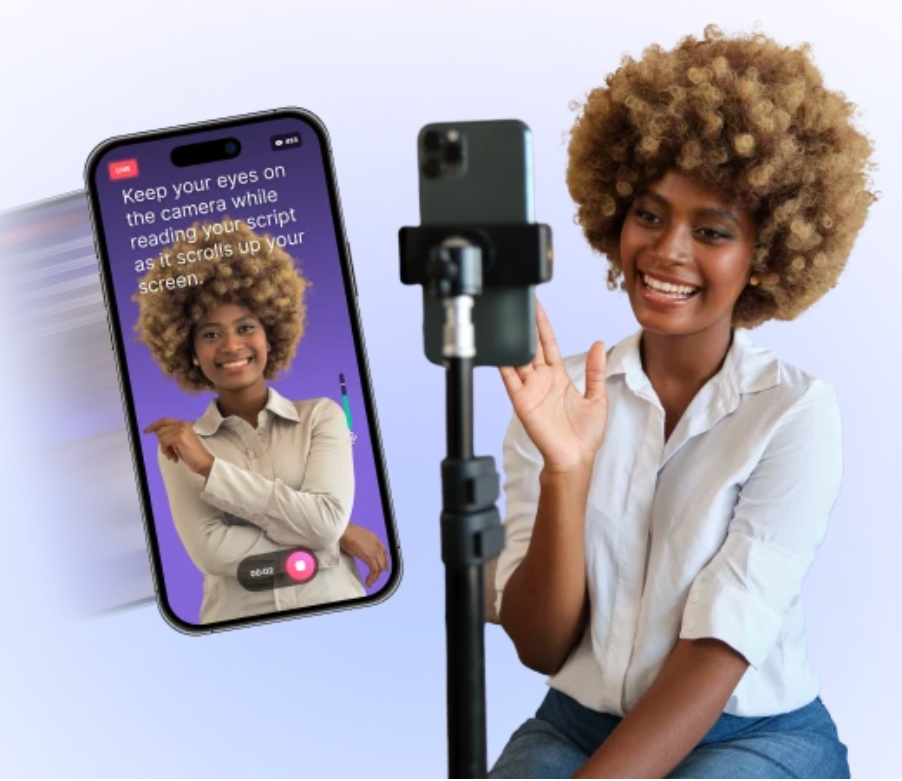
BIGVU is a video recording and editing platform with a built-in teleprompter. Its main purpose is to help people record polished videos while reading a script naturally.
The big feature is the teleprompter. You write or paste your script, set the scrolling speed, and read it while looking toward the camera. This helps you avoid the common real estate video problems:
Forgetting what to say
Staring off-screen at notes
Recording five takes because the wording feels off
Rambling too long
Sounding less confident than you are
The platform also includes tools for editing, captions, branding elements, and video formatting. Depending on the plan and current feature set, BIGVU may also include AI-assisted writing or video tools that help create scripts, titles, or shorter clips.
For a real estate agent, the most useful parts are usually:
Teleprompter recording
Great for market updates, listing intros, buyer tips, seller tips, and neighborhood videos.
Captions
Helpful because many people watch videos with the sound off.
Script writing support
Useful when you know the topic but do not want to start from a blank page.
Video templates and styling
Helpful for keeping your videos consistent.
Mobile recording
Useful when filming at listings, open houses, neighborhoods, or walkthroughs.
The appeal is not that BIGVU turns you into a filmmaker overnight. The appeal is that it removes friction. If recording one video takes less time and feels less awkward, you are more likely to keep doing it.
BIGVU pricing and what to expect
BIGVU uses a plan-based pricing model. Pricing can change, so check the official pricing page before buying. In general, expect a mix of free and paid options, with higher plans unlocking more video tools, more usage, and more team or brand features.
Here is the practical way to think about the pricing.
Plan type | Best fit | What to look for |
Free or starter access | Testing the platform | Basic teleprompter use, limited exports, feature restrictions |
Individual paid plan | Solo agents who make regular videos | More recording tools, captions, editing options, and fewer limits |
Higher individual plan | Agents who post often | More AI tools, stronger editing features, more polished outputs |
Team or business plan | Small teams or brokerages | Shared assets, multiple users, team controls, and brand consistency |
The most important question is not “What is the cheapest plan?” It is “Will this help me record video often enough to justify the cost?”
For many agents, the value comes from saving time. If you spend an hour trying to record a two-minute video, even a modest monthly tool can pay for itself quickly. If you only record one video every few months, the free or lowest plan may be enough.
Pros and cons for real estate agents
No video tool is perfect. BIGVU is strongest when you need help speaking clearly on camera. It is less useful if you already have a polished video workflow or prefer fully cinematic property tours.
Pros
Helps you sound more prepared on camera
Reduces retakes by giving you a script on screen
Useful for listing videos, market updates, and educational clips
Captions can make videos easier to watch
Mobile recording works well for agents on the go
Can help create a consistent video habit
The 50% off offer lowers the cost of trying it
Cons
Videos can feel too scripted if you read without practice
Some features may be limited by plan
You still need good lighting, sound, and a clear message
It will not replace high-end listing videography
Editing tools may not satisfy agents who want advanced control
AI script tools still need your local knowledge and personality
Pricing and included features can change
The biggest advantage is confidence. Many agents avoid video because it feels awkward. A teleprompter gives structure, and structure often makes recording easier.
The biggest risk is sounding robotic. That is easy to fix with a few habits:
Write the way you actually speak.
Use short sentences.
Practice once before recording.
Smile before the first line.
Leave small pauses between ideas.
Do not pack too much into one video.
A good real estate video does not need perfect production. It needs a clear point, a confident delivery, and enough personality to feel human.
When BIGVU is valuable for a real estate agent
BIGVU is most valuable when the video depends on what you say, not just what the camera shows.
A cinematic home tour with drone footage, room transitions, and music may still call for a professional videographer. But many real estate videos are simple talking-head or walkthrough videos. For those, a teleprompter can be a big help.
Listing introduction videos
Before a full property tour, an agent can record a short intro:
“This three-bedroom home in a quiet neighborhood has an updated kitchen, a fenced backyard, and quick access to local parks.”
That sounds easy, but it is common to fumble when recording. With BIGVU, you can prepare the intro, read it naturally, and move on.
This is useful for:
New listing announcements
Open house previews
Price improvement updates
Coming soon videos
Short property highlight clips
Local market updates
Market update videos are a strong use case because accuracy matters. You do not want to wing it when sharing inventory trends, average days on market, or buyer activity.
A script keeps the message tight.
For example:
One quick update on buyer demand
One note about inventory
One takeaway for sellers
One takeaway for buyers
That structure can turn a messy five-minute video into a useful 60 to 90 second clip.
Buyer and seller education
Real estate agents answer the same questions all the time:
How much should I save before buying?
What happens after an offer is accepted?
Should I sell before I buy?
What repairs matter before listing?
What does a home inspection cover?
These are ideal video topics. BIGVU helps you record clear answers without rambling. Over time, those videos can also become a reusable library. Send them to leads, past clients, or people who ask common questions.
Neighborhood and community videos
Neighborhood videos work best when they feel natural and specific. You can use a short script to avoid missing key points while still sounding conversational.
For example, a simple neighborhood video might cover:
The general feel of the area
Common home styles
Nearby parks or amenities
Commute patterns
Who the area may fit
This is where your local knowledge matters more than any software. BIGVU gives you the structure, but you still bring the insight.
Follow-up videos for leads and clients
Personalized video follow-ups can feel more thoughtful than a standard text or email. You might use BIGVU for short scripts after:
A buyer consultation
A listing appointment
An open house
A showing
A price discussion
A home valuation request
These videos do not need to be fancy. They need to feel clear and helpful.
When BIGVU may not be the best fit
BIGVU is helpful, but it is not always necessary.
If you are only making silent property walkthroughs with music, the teleprompter may not matter much. If your brokerage already provides video production, you may not need another paid tool. If you prefer highly detailed editing with color grading, advanced audio work, and multi-camera control, you may outgrow the built-in editing features.
It may also be less valuable if you are not willing to write or review scripts. A teleprompter does not fix a weak message. If the script is vague, the video will be vague.
The tool works best when you have a simple plan:
Pick one topic.
Write a short script.
Record in good light.
Keep the video focused.
Share it with a clear purpose.
The agents who benefit most are not always the most tech-savvy. They are the ones who want to show up on camera more often and need a repeatable way to do it.
Have you tried BigVu? Please feel free to comment below and let us know your thoughts!

Comments